Expert Review: This article includes clinical insights from Dr. Vivek Arora, a physical therapist (physiotherapist) with 20+ years of experience.
If your back starts to ache an hour into a morning on the walking pad, the walking itself is rarely the problem. Most walking pad lower back pain comes from how under-desk walking differs from ordinary walking: a short belt, arms parked on a keyboard, a desk never raised to match the deck, crawling speeds, and sessions that run for hours.
Fix those, and a walking pad (or any under-desk treadmill) usually goes back to being good for your back.
Key takeaways
- Setup and dose drive most of it. The belt, desk and hours change how you walk.
- Typing freezes the trunk. Fixed hands remove the arm swing and rotation that share each step’s load.
- Raise the desk by the deck height. Many pads lift you roughly 10–20 cm (4–8 inches).
- Match speed to the task. Stop the belt for focused typing; walk faster only hands-free.
- Leg symptoms change the picture. Pain, tingling or weakness below the knee suggests a nerve problem.
Why does a walking pad cause lower back pain?
Back pain on a walking pad happens because walking on a compact belt while you work is a different activity from walking outdoors. The belt shortens your step, the keyboard fixes your arms, slow speeds break your rhythm, and a low desk or screen pulls you into a lean. Over hours, the same low back tissues work without a break, and eventually they ache.
Outdoors, your pelvis turns with each swinging leg while your ribcage and opposite arm turn the other way. That counter-rotation spreads the load across hips, trunk and shoulders, and the gluteus maximus (the large buttock muscle) drives each hip back.
What changes on a walking pad
- A short, narrow belt. Many pads are about 100–120 cm (39–47 inches) long and 38–45 cm (15–18 inches) wide. Taller walkers shorten their stride, trimming hip extension and glute work.
- Fixed arms. Typing stops arm swing, so the obliques and the quadratus lumborum (a deep muscle between the pelvis and the lowest rib) brace the ribcage against a pelvis that still wants to turn.
- Very slow speeds. Comfortable outdoor walking sits around 4.5–5 km/h (2.8–3.1 mph). Below about 3 km/h (1.9 mph), walking tends to become a controlled, stop-start shuffle.
- A desk and screen that are now too low. The deck lifts you, so you hunch toward the keyboard and look down at the screen.
- Long, identical sessions. A flat belt repeats the same stride for hours.
Three postures that load the low back
- Hanging on the hips. The pelvis drifts ahead of the feet and the low back arches into extension, loading the facet joints (small paired joints at the back of each vertebra).
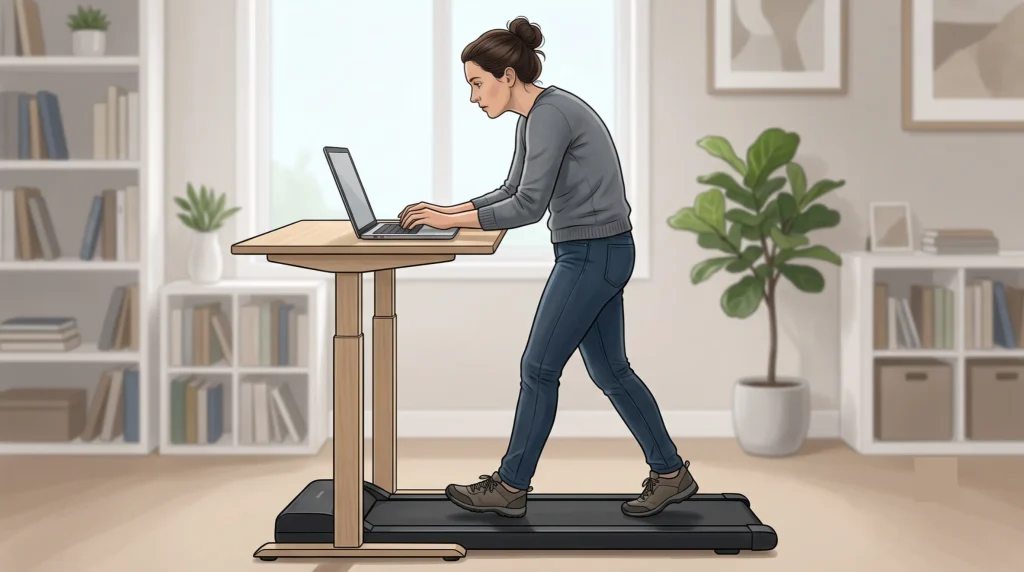
- The desk lean. With no handrails, people lean on the desk or toward a low keyboard, and the back muscles hold that lean nonstop.
- The typing freeze. The shoulders lift, the ribcage locks and only the legs move, turning walking into hours of low-level bracing.
These patterns tend to hit new pad owners, heavy typists, taller users on compact belts and backs that dislike long standing. If outdoor walks hurt too, the pad is probably not the cause; start with low back pain from walking and how to ease it instead.
Three walking pad beliefs worth dropping
- Myth: more hours, more benefit. Past a point, extra hours add postural load and little else.
- Myth: stand tall and rigid. Stiff bracing removes the small rotations walking needs. Aim for upright but loose.
- Myth: pad time is my exercise. It breaks up sitting but does not replace brisk walking or strength work.
What does the location of the ache tell you?
The timing and location of the ache are your best clues. A belt-line ache that builds with time usually points to an arched, hips-forward posture. Pain higher up with neck tightness suggests leaning toward a low desk or screen. Pain or tingling below the knee suggests an irritated nerve rather than a setup problem.
| What you notice | What it often suggests | First change to try |
|---|---|---|
| Belt-line ache after 20–40 minutes, eased by sitting | Hips forward, low back arched | Keyboard closer, walk mid-belt, add hands-free minutes |
| Ache higher up, toward the shoulder blades or neck | Leaning onto a low desk or screen | Raise the desk by the deck height; screen to eye level |
| One-sided ache near a back dimple or in the buttock | Uneven gait: fixed mouse hand, crossing feet, one hip dropping | Switch mouse sides; keep hip-width steps |
| Front-of-hip or groin pain with the back pain | Hip flexor overload or the hip joint itself | Get the hip checked if it persists |
| Heavy legs, eased fast by leaning or sitting | A pattern associated with lumbar spinal stenosis | Get assessed instead of leaning |
Groin pain that grows as you lengthen your stride may be the hip, not the spine; here is how to tell lower back pain apart from hip pain. Pain down the back of the leg behaves more like sciatica, which needs a different dose, explained in whether walking is good for sciatica.
The heavy-legs row deserves a closer look. Lumbar spinal stenosis, a narrowing around the low back nerves that is more common after middle age, tends to worsen upright and ease with leaning forward, so leaning on the desk can quietly mask it.
When is walking pad back pain a sign of something serious?
Most back pain that starts on a walking pad is mechanical and settles with changes to setup and dose. A few symptoms point elsewhere and should never be handled by adjusting the desk. Each is listed with why it matters and how fast to act.
- Saddle numbness or bladder or bowel changes. Numbness in the saddle area (where a bike saddle would touch), or trouble controlling urine, can mean the nerve roots that run the bladder and bowel are being squeezed (cauda equina syndrome). Go to an emergency department now.
- Worsening leg weakness. A slapping foot, or toes that keep catching the belt on one side, can mean a nerve root is failing to conduct. Get assessed urgently.
- Chest pain, unusual breathlessness, or pain into the arm or jaw. Exertion can unmask a heart problem; sudden tearing back pain with faintness can be vascular. Stop the belt and call emergency services.
- Fever, chills or feeling unwell. Spinal infection is rare but serious, especially after recent infection or surgery. Get medical review the same day.
- Cancer history, unexplained weight loss, or constant pain unchanged by position. Mechanical pain varies with posture; pain that never does needs medical review soon.
- Pain after slipping off the belt or falling. Older age, osteoporosis or long-term steroids lower the force needed to crack a vertebra, so get same-day medical review.
Seek care if any of these apply
- Two weeks after trimming pad time and fixing the desk, the ache is unchanged.
- Tingling, numbness or pain has started reaching past the knee.
- Pain wakes you most nights.
Each suggests more than setup; a physical therapist (physiotherapist) or doctor can work out what.
Should you get a scan for walking pad back pain?
In most cases, no. Imaging shows bones, discs and nerves, but not a low desk, a shuffling stride or two unbroken hours of typing, which drive most walking pad back pain. Scans help when red flags are present, when weakness or numbness is progressing, or when nerve pain persists and an injection or surgery is being considered.
From middle age onward, scans also commonly show disc bulges and arthritis in people without pain, which can make walking feel dangerous when it is not. This guide to the jargon on a typical low back X-ray report puts that language in context.
From the Clinic: Dr. Arora’s Expert Insight
Thirty seconds of shaky phone footage, shot side-on while someone answers email on their walking pad, usually tells me more than the whole conversation that follows. Nobody can feel their own walking pattern from the inside. People describe what they intend; the camera records what their attention allows.
A pattern that comes up repeatedly is that the walk changes with the task. For the first few seconds, while the person still remembers the phone, everything looks fine. Then they start writing something that needs real thought: the arms lock, the steps shrink, and the feet drift back until a near-miss sends them hurrying forward. That drift-and-catch cycle is why the same person, on the same pad, feels fine on call-heavy days and sore on writing days.
The generic advice that fails most predictably here is to start slow. People hear it as a speed instruction and set the belt to a crawl, exactly where walking becomes a careful shuffle. What I want instead is to start short: brief blocks at a pace where the step still looks like a step, with the belt stopped for deep concentration. Permission to stand still while typing is often the most useful change people make.
How do you set up a walking pad so your back stops hurting?
Set the desk for your height on the pad, not on the floor. Then raise the screen to eye level, position the pad so your upper arms hang close to vertical while you type, and pick a belt speed that fits the task.
The walking pad setup checklist
- Measure the deck. With the pad off, measure from the floor to the belt surface. Many sit around 10–20 cm (4–8 inches).
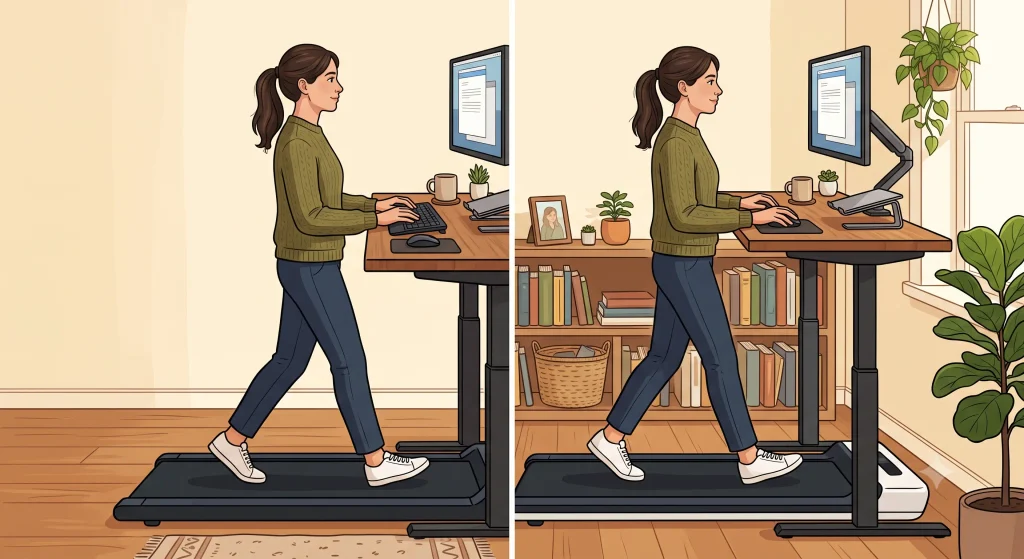
- Raise the desk by that amount, in the same shoes. On the pad, aim for elbows at 90–100 degrees and the keyboard at or just below elbow height.
- Lift the screen. The top line of text should sit at or just below eye level, about 50–70 cm (20–28 inches) away. A laptop needs a stand and a separate keyboard.
- Move the pad, not your hips. Walking mid-belt, your upper arms should hang near vertical. If you reach, move the pad closer.
- Choose speed by task, using the table below. If your pad has an incline, test a slight one only during hands-free blocks.
- Wear walking shoes (trainers, in the UK) for blocks longer than about 15 minutes.
- Stay safe. Use a level floor, keep cables clear, and never step on or off a moving belt.
What speed should you walk at while working?
These bands, in kilometers and miles per hour (mph), are practical starting points, not research-derived rules.
| Task | Belt speed | Why this band |
|---|---|---|
| Focused writing, coding, spreadsheets | Stopped, or up to 2 km/h (1.2 mph) in short spells | At a crawl, the stride tends to collapse into a shuffle |
| Email, chat, light admin | 2–3 km/h (1.2–1.9 mph) | Pauses let you lengthen your step |
| Calls, reading, camera-off meetings | 3–4 km/h (1.9–2.5 mph) | Free hands let the arms swing |
| Walking only | 4–5.5 km/h (2.5–3.4 mph) | Closest to outdoor walking |
The 30-second side-on video check
Prop your phone side-on at hip height, 2–3 meters (7–10 feet) away, and film 30 seconds of real work, not posing.
- Stack. Pass: head over ribcage, ribcage over pelvis. Fail: hips ahead of the feet, or the head leading.
- Weight. Pass: hands light on the keys. Fail: forearms pressing into the desk.
- Step. Pass: steps clearly longer than your foot, heel first. Fail: a flat-footed shuffle.
- Position. Pass: you stay mid-belt. Fail: you drift back and hurry forward.
- Movement. Pass: shoulders and arms move a little. Fail: a frozen upper body.
Two or more fails usually explain the ache. Fix the matching setup item, then film again in a week.
How should you handle the first 24–72 hours?
Reduce rather than stop. Short, easy walking and frequent position changes often calm a setup-related flare-up within a few days, while complete rest tends to leave the back stiffer. Fix the desk and screen before your next session so the same load does not return.
What to do today
- Halve pad time, or pause for a day or two if the pain is sharp.
- Take two or three easy 10–15 minute walks.
- Alternate sitting, standing and walking every 30 minutes.
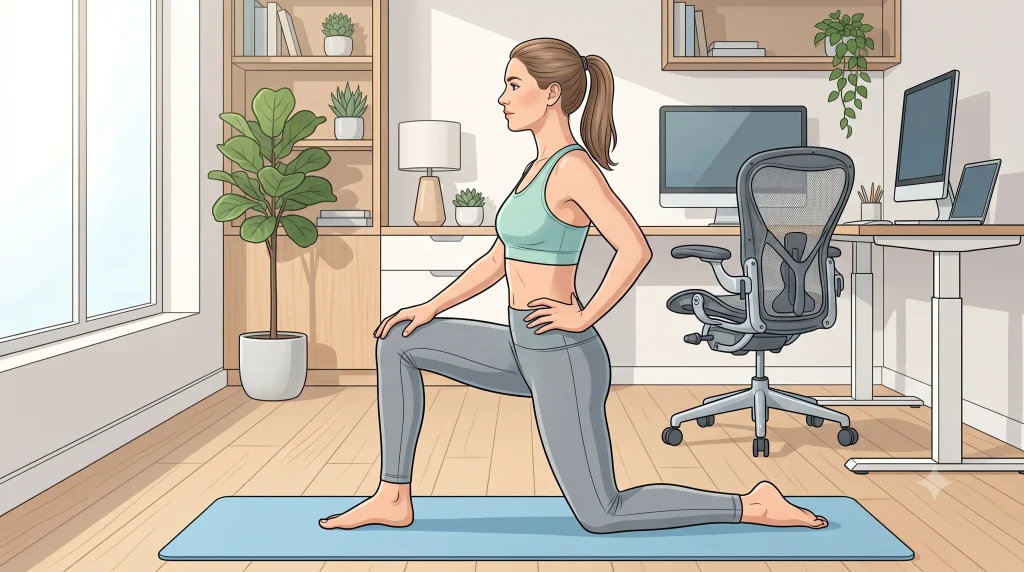
- Try gentle knee rocks lying on your back and a half-kneeling hip flexor stretch.
- Note how your back feels on waking tomorrow.
Heat or a cold pack can ease symptoms; here is how to choose between a cold pack and a heat wrap.
How long and how fast should you walk on a walking pad?
Start with 10–15 minute blocks, two or three times a day, at a speed where your step still looks like a step. Add time only when your back feels no worse the next morning. Over about four weeks, many people can build to 30–45 minute blocks, three or four times a day.
Use a simple pain rule of thumb: during a block, pain may rise up to 2 points on a 0–10 scale if it settles within an hour and the next morning is no worse. If not, repeat the previous week.
| Week | Each block | Blocks per day | What the blocks contain | Move on when |
|---|---|---|---|---|
| 1 | 10–15 min | 2–3 | Hands-free walking or calls, 3–4 km/h (1.9–2.5 mph) | Pain rule met every day |
| 2 | 15–20 min | 3 | Add email at 2–3 km/h (1.2–1.9 mph) | Two days in a row with no morning flare |
| 3 | 20–30 min | 3–4 | Add typing spells of up to 10 minutes | Video check passes four of five items |
| 4 | 30–45 min | 3–4 | Normal work mix, a hands-free minute every 10 minutes | A full workday with no extra morning stiffness |
When is it safe to go back to full walking pad days?
Return when you pass these tests in order, within the pain rule, not when pain simply fades.
- 20 minutes of hands-free walking at 4 km/h (2.5 mph), plus a 30-minute outdoor walk at your normal pace.
- Two 30-minute call blocks in one day at 3 km/h (1.9 mph), with the video check passing.
- A typical workday of three or four blocks with no extra morning stiffness.
Fail one, and stay at the previous step for three to five days. Setup-related pain often clears in days to a few weeks.
Which exercises help a walking pad back, and why?
The most useful exercises restore what pad sessions take away: the hip extension a short belt trims, the side-of-hip control a narrow belt demands, and the trunk rotation typing removes. Do these most days, one or two sets each, raising pain by no more than a couple of points.
- Half-kneeling hip flexor stretch. Tuck the tailbone and shift forward; hold 30 seconds, twice per side. Why: a short stride keeps the hip flexors shortened, pulling you into the hips-forward arch. Easier: a standing split stance.
- Glute bridge. Do 2 sets of 10 with a 2-second hold. Why: it retrains the hip extension a compact belt cuts short. Harder: a single-leg bridge.
- Side-lying hip lift. Lift the top leg about 30 degrees, slightly behind you, for 2 sets of 10–12. Why: the gluteus medius (the side-hip muscle that keeps your pelvis level) works harder on a narrow belt.
- Open-book rotation. Lying on your side, sweep the top arm over until your chest faces the ceiling, 8–10 slow reps per side. Why: it restores the rotation that typing locks out.
- Suitcase carry. Carry 8–12 kg (18–26 lb) in one hand for 20 meters (65 feet), tall and level, 3 rounds per side. Why: it trains an upright, loose trunk while walking.
Walking pad do’s and don’ts
| Do | Don’t |
|---|---|
| Re-measure desk height whenever your pad, shoes or desk change | Type at a speed that shrinks your step to a shuffle |
| Stop the belt for deep work | Lean your weight on your forearms |
| Spend a few minutes of every block hands-free | Let back-to-back meetings become a two-hour block |
| Keep some outdoor walking in your week | Add incline while typing, or walk through pain spreading into the leg |
What if walking pad lower back pain is not improving?
If four to six weeks of a corrected setup and a graded build-up have not helped, the pad probably is not the whole story. See a physical therapist, who can assess your gait, hips and nerve function, or a doctor if there are medical concerns. Surgery is almost never the answer to pain caused by walking pad use itself.
Surgery or specialist referral is considered for specific conditions, such as a disc herniation with worsening weakness or severe spinal stenosis that keeps limiting walking despite good conservative (non-surgical) care. Pad-related pain has a good outlook, because every input, from desk height to block length, can be changed.
Can a walking pad actually help lower back pain?
Yes, as a way to add easy walking to a day otherwise spent sitting. Walking has encouraging evidence behind it for people prone to back pain. What has not been shown is that an active workstation, on its own, reduces back pain, so treat the pad as a walking tool rather than a treatment.
In the WalkBack trial, adults who had recently recovered from low back pain followed an individualized, progressive walking and education program guided by a physical therapist over six months. They went a median of 208 days before their next episode, compared with 112 days in an untreated control group (Pocovi and colleagues, 2024).
Workplace research is less encouraging. A Cochrane review of workplace interventions to get sedentary workers standing or walking more found low- to very-low-certainty evidence that did not show fewer musculoskeletal symptoms, and research on compact walking pads is thin. Backs that stiffen with long sitting often do well on a pad; backs that dislike prolonged standing may prefer shorter blocks.
Fixing walking pad lower back pain: where to start
The pad is rarely the villain. Pain usually comes from a desk never raised for the deck, a low screen, crawling speeds, frozen arms and hours-long sessions. Today, measure your deck height and raise the desk by that amount. Tomorrow, keep blocks to 15 minutes at a speed where your step still looks like a step, then film your 30-second video.
If pain travels into the leg or a red flag appears, skip the tinkering and get assessed.
Frequently asked questions
1. Is a walking pad bad for your back?
No, not in itself. Back pain from a walking pad usually comes from a desk too low for the deck, slow shuffling while typing and long unbroken sessions. Fix those, keep each block under about an hour, and a pad is a reasonable way to break up sitting.
2. Should I hold on to my desk while walking on a walking pad?
Only lightly, if at all. Fingertips on the desk for balance are fine, but leaning through your forearms tips the trunk forward and stops the rotation walking relies on. If you need to hold on to feel steady, slow or stop the belt.
3. Is it better to walk barefoot or in shoes on a walking pad?
Shoes are the safer default for anything longer than about 15 minutes. Barefoot or socks suit short blocks if your feet are used to it, but socks can slip on the belt, and tired, gripping feet tend to stiffen your stride.
4. Can a walking pad cause sciatica or a slipped disc?
It is very unlikely to cause a disc herniation (a slipped disc), but it can aggravate a nerve that is already irritated. Long upright sessions with the hips pushed forward may increase leg symptoms. If pain or tingling spreads below the knee, cut back and get assessed.
5. Will walking through the pain on my walking pad cause permanent damage?
Pain within the pain rule (no more than a 2-point rise on a 0–10 scale, settling within an hour, no worse the next morning) is very unlikely to be causing harm. Pad-related pain usually reflects sensitized, overloaded tissue, not damage. Pain that keeps climbing, spreads into the leg, or brings numbness or weakness means stop and get checked.
6. Is a walking pad or an elliptical better for a sore lower back?
It depends on what aggravates your back. A pad keeps you upright for long periods, which can bother backs that dislike standing; an elliptical (a cross-trainer, in the UK) is a shorter workout with its own posture traps. This guide to elliptical machine lower back pain covers those.
Medical disclaimer
Treat the desk heights, belt speeds and block lengths as starting points, not a diagnosis or personal plan.
A moving belt plus a screen carries a fall risk. If you have balance problems, dizziness, osteoporosis, recent surgery, a heart or lung condition, or you are pregnant, get individual advice before walking while you work.
References
- Pocovi NC, Lin CWC, French SD, Graham PL, van Dongen JM, Latimer J, et al. Effectiveness and cost-effectiveness of an individualised, progressive walking and education intervention for the prevention of low back pain recurrence in Australia (WalkBack): a randomised controlled trial. Lancet. 2024;404(10448):134-144. doi:10.1016/S0140-6736(24)00755-4
- Parry SP, Coenen P, Shrestha N, O’Sullivan PB, Maher CG, Straker LM. Workplace interventions for increasing standing or walking for decreasing musculoskeletal symptoms in sedentary workers. Cochrane Database Syst Rev. 2019;2019(11):CD012487. doi:10.1002/14651858.CD012487.pub2